
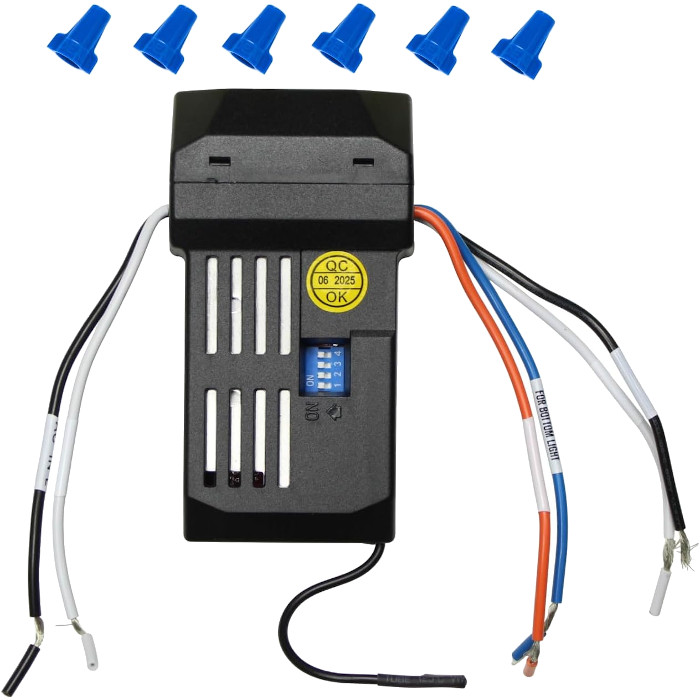
Replace a ceiling fan receiver when the fan hums, sticks on one speed, turns on by itself, or ignores a remote you know works. Choose the replacement by the part number printed on the old receiver. Switch off the breaker before lowering the canopy, follow the receiver's wiring diagram, then pair it with your remote.
The receiver is the part of a remote-controlled ceiling fan most people never see. It sits tucked inside the canopy against the ceiling, or on some fans in the switch housing beneath the motor, and it turns your remote’s button presses into power for the motor and the light. When it fails, the fan can act possessed, refuse to change speed, or simply sit still. This guide helps you confirm the receiver is really the problem, pick the right replacement by its number, and understand what the installation involves before you climb the ladder.
Signs your ceiling fan receiver is bad
A faulty receiver tends to show itself in ways a dead remote can’t explain:
- The fan hums or buzzes but the blades don’t turn, or turn very slowly.
- One speed works and the others don’t, or the fan is stuck at a single speed.
- The fan or light switches itself on or off with nobody touching the remote.
- The light flickers, won’t dim, or won’t switch off.
- The fan responds only some of the time, even with a fresh battery right underneath it.
- A new remote with exactly the same number as your old one won’t pair, no matter how carefully you time it.
- There is a burning smell, discoloration or melted plastic near the canopy.
Random on/off behavior can also come from a code clash with a nearby device, which costs nothing to fix. Read why a ceiling fan turns on by itself before you assume the receiver is at fault.
How to test whether it’s the receiver
You can narrow things down a long way without opening anything.
Rule out the remote
Put in a new battery and re-pair, or on DIP-switch fans double-check the code. If you have a second remote or a wall control for the same fan, try it. When a remote you know works still can’t run the fan, the receiver moves to the top of the suspect list. Our ceiling fan remote troubleshooting guide runs through every remote-side check, and how to pair a ceiling fan remote covers re-pairing by method.
Rule out power
Make sure the wall switch is on and the breaker hasn’t tripped. Turn the circuit off for about 30 seconds and back on to reset the receiver. If the fan has pull chains, set the speed chain to high and the light chain to on, so the receiver isn’t being limited by them.
Leave the bypass test to an electrician
The definitive test is to temporarily take the receiver out of the circuit and run the motor directly. If the fan works without the receiver, the receiver is bad; if it still doesn’t, the problem lies in the motor or wiring. That test means disconnecting and reconnecting house wiring and then powering the fan, so it is a job for a licensed electrician, not a homeowner. The Electrical Safety Foundation International strongly recommends a qualified, licensed electrician for electrical work in your home.
Choosing a replacement receiver by the number on it
Receivers are not one-size-fits-all. They differ in radio frequency, pairing method (DIP switches or learning code), the number of speeds, whether they control reverse, and whether they run one light or separate up and down lights. The only reliable way to get a match is the number printed on your existing receiver.
- Find the label. With the breaker off and the canopy lowered, look on the receiver’s case for a part or model number. Photograph it along with the wire colors.
- No readable label? The number on your remote, or the fan’s own model number from the motor housing or the manual, can help us identify the right listing. Our page on finding your model number shows where to look.
- Match it exactly. Order the listing whose title carries your number. A receiver that looks the same but has a different number may not respond to your remote at all.
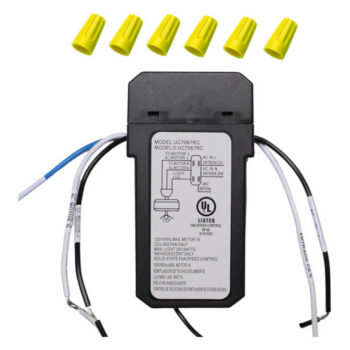
Some receivers have DIP switches and some learn a code; the listing for your number tells you which. Light configuration matters too. For instance, the UC7067RC fan receiver and the UC7067YGM fan receiver listings each handle an uplight and a downlight, while the UC7067FMRX fan receiver listing runs a single downlight. Other Hampton Bay receivers we stock include the UC7051R fan receiver and the CHQ8BT7051R fan receiver. Each is sold for its own number only. Some Hampton Bay fans also use a separate plug-in reverse module, and we stock the UC7067REV reverse module as its own listing.
What if your fan never had a receiver, or the brand is unknown?
If you’re adding remote control to a pull-chain fan, a matched remote-and-receiver kit is often simpler. The SR400 remote and receiver kit includes both halves; note from its listing that it offers four speeds plus off and that reverse is handled by the switch on the fan motor. Our guide to adding a remote to a ceiling fan explains the trade-offs.
Installation overview: what replacing a receiver involves
This is a summary, not a wiring lesson. Every receiver comes with its own diagram, and that diagram is what you follow. If any step below makes you uneasy, stop and call a licensed electrician.
- Switch off the breaker. Turning off the wall switch is not enough. Confirm the power is off with a non-contact voltage tester before touching anything; Hunter’s remote and receiver support article likewise says to turn off power to the outlet box and confirm with a voltage meter before you touch the wires.
- Lower the canopy. Support the fan as the canopy screws come out. Many fans hang on a hook or bracket while you work.
- Photograph the connections. Before you undo a single wire nut, take clear pictures of how every wire is joined.
- Remove the old receiver. Disconnect it and lift it out of the mounting bracket.
- Set the code, if your receiver has DIP switches. Match them to your remote before installing, while they’re easy to reach.
- Connect the new receiver. Match the labeled wires to the same connections the old receiver used, following the receiver’s diagram. Cap any lead you don’t need as the instructions describe.
- Tuck everything in. Fold the wires neatly, position any antenna wire as the instructions show, and refit the canopy without pinching anything.
- Restore power at the breaker and move straight on to pairing.
Pairing after you replace the receiver
A new receiver doesn’t know your remote yet. How you introduce them depends on the type:
| Receiver type | How it pairs | What success looks like |
|---|---|---|
| DIP switches | Switches already set to match the remote during installation | Fan responds as soon as power is restored |
| Learning code (Learn or held button) | Press the remote’s pairing button within the window after power-up, often about 30 seconds | Light blinks or the fan starts on low |
| Learning code with setup run (many DC fans) | Press Set within about 60 seconds of power-up | Fan spins both directions for a few minutes, then stops |
Test everything once paired: off, each speed, reverse if your fan has it, and the light, including dimming. If pairing fails, cut the power, wait several seconds and try again, a little faster. For DIP-switch details see ceiling fan DIP switch settings.
Order the receiver that matches your label
Getting the number right is what makes the replacement work, so start there. Browse our ceiling fan receivers or the Hampton Bay and Harbor Breeze collections, and compare the title of each listing to the label you photographed. If the label is faded or you can’t tell which part you have, text a photo of the receiver and your remote to (816) 586-8457, call that number weekdays 8 AM to 5 PM Central, or email info@fanremotes.com. In-stock orders placed by 4 PM Central ship the same day, shipping is free over $35, and items that haven’t been installed can be returned within 90 days with no restocking fee; see our return policy.
Shop the Parts in This Guide

Frequently Asked Questions
Where is the receiver in a ceiling fan?
On most fans it sits inside the canopy, the cover that rests against the ceiling. On some fans, including certain Hampton Bay models, it is in the switch housing below the motor instead.
How long does a ceiling fan receiver last?
There is no fixed lifespan. Some last as long as the fan, while others fail after a power surge or years of use.
Do I need a new remote when I replace the receiver?
Not necessarily. If your remote still works and the new receiver has the same number as the old one, you can usually pair your existing remote to it.
Can I replace a ceiling fan receiver myself?
Many homeowners do, but it means working with house wiring overhead. If you're not comfortable switching off the breaker, testing for power and reconnecting wires, hire a licensed electrician.
What does it mean if the new receiver won't pair?
Recheck that the receiver's number matches your old one exactly, that the DIP switches match the remote if it has them, and that you pressed the pairing button within the time window. If all three are right, contact us with photos.