
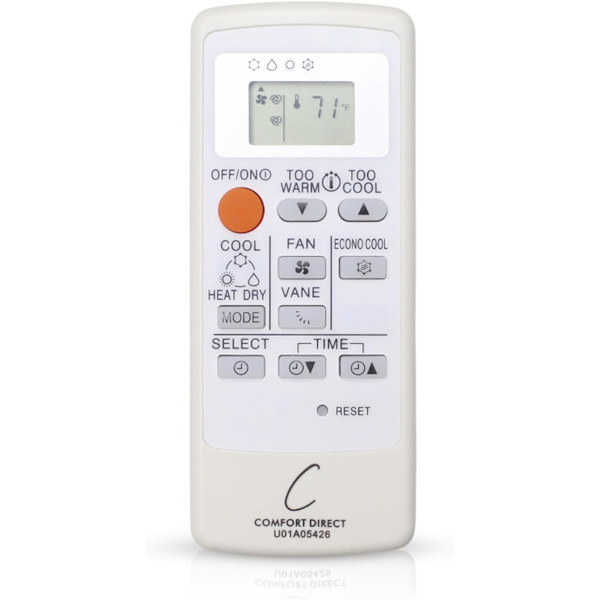
To replace a Mitsubishi mini-split remote, find the part number on the back or inside the battery cover of your old remote, or the MSZ model number on the indoor unit's label. Order the remote listed under that exact number, fit two AAA batteries, press RESET, and aim it at the indoor unit. There's nothing to program.
Mitsubishi Electric wall-mounted mini-splits are some of the most common ductless systems in American homes, and nearly all of them are run from a small handheld infrared remote. When that remote goes missing, cracks, or stops making the indoor unit beep, you can still get by for a while, but you lose easy control of mode, set temperature, fan speed and the vane. This guide shows you how to identify exactly which remote your unit uses, how to set up a replacement, and what to check if the new one seems to do nothing.
How Mitsubishi mini-split remotes work
Unlike a ceiling fan remote, a Mitsubishi mini-split remote talks to the indoor unit with a beam of infrared light, much like a TV remote. There is no radio receiver to sync and no code to enter. The trade-off is that the remote needs a clear line of sight to the receiver window on the front of the indoor unit. A tall plant, a curtain or a cabinet door in the way can block it.
Your current settings show on the remote’s own display, and the indoor unit answers with a short beep when it accepts a command. If you hear the beep, the remote and the unit are talking.
Where is the model number on a Mitsubishi indoor unit?
The number you want belongs to the indoor unit, the long head mounted high on the wall. Mitsubishi indoor wall units in the M-Series use model numbers that begin with MSZ, followed by a series code such as HM, WR or JP, a capacity number and a revision suffix like -U1 or -U2. The outdoor condenser carries a different number (typically starting with MUZ), so don’t buy from that label.
Places to look
- A side panel of the indoor unit. Many wall heads have a rating sticker on one end. Use a flashlight; it is often small and faded.
- Behind the front grille. With the system switched off, lift the front panel the way you would to clean the filters and look for a label inside.
- Your paperwork. The installer’s invoice, warranty registration or owner’s manual usually lists the full indoor model.
Finding the number printed on your old remote
If you still have the original remote, even a broken one, flip it over and open the battery cover. Most Mitsubishi remotes have a part number or model code printed on the back or on a sticker inside the battery compartment. Codes you may see include U01A05426, MS16A and E22P88426. Whatever code you find, that exact code is the one to shop for. Our guide on how to find your remote model number has photos of where these labels usually hide.
You may also see an FCC ID on the back of some remotes. That is a registration label, not something to shop by. Stick to the part number, or simply text us a photo.
Which Mitsubishi remote do I need?
Use whichever number you can read most clearly, then buy the listing that names that exact number:
| What you have | What to do |
|---|---|
| The old remote shows U01A05426 | Order the U01A05426 mini-split remote |
| The old remote shows MS16A | Order the MS16A mini-split remote |
| The old remote shows E22P88426 | Order the E22P88426 air conditioner remote |
| No remote, but you have the indoor unit model (MSZ-…) | Find the listing titled with your full indoor model in the product grid below, or search the store for your series, such as MSZ-HM remotes or MSZ-WR remotes |
| Can’t read either number | Text a photo of the remote or the unit label to (816) 586-8457 |
Don’t guess based on looks. Many Mitsubishi remotes are white rectangles with similar layouts, and a remote built for one model family may not send the commands another unit expects.
Setting up a replacement Mitsubishi remote
There is nothing to program, so setup takes about a minute:
- Slide off the back cover and fit two fresh AAA alkaline batteries (sold separately). Mitsubishi’s instructions say to seat the negative end first and to check the + and – marks.
- Close the cover, then gently press the recessed RESET button with the tip of a pen or a straightened paper clip. Mitsubishi warns the remote may not operate correctly if you skip this.
- Point the remote at the indoor unit from your usual seat and press OFF/ON. Listen for the beep.
- Choose a mode and a temperature, then pick a spot near the room’s doorway where the remote will live.
On the MSZ-HM manual, holding the temperature buttons while pressing RESET switches the display between Fahrenheit and Celsius. If your new remote shows the wrong scale, that is the fix. These remotes use countdown ON and OFF timers set in one-hour steps rather than a clock, so there is no time of day to set on that series.
What the buttons on a Mitsubishi remote do
Layouts vary a little by series, but on the common MSZ-HM style remote you’ll find:
- OFF/ON: starts or stops the indoor unit.
- Operation select (MODE): cycles COOL, DRY and HEAT on heat-pump models.
- Temperature up/down: changes the set point.
- FAN: steps through the fan speeds.
- VANE: changes the direction of the airflow by moving the louver.
- ECONO COOL: an energy-saving cooling option that works only in COOL mode.
- TIMER and TIME set: an OFF timer or an ON timer (the manual notes you can’t use both at once).
Check the operating manual for your specific series for any extra buttons. You can find many in our manuals library.
Mitsubishi mini-split not responding to the remote?
Before you assume the remote is dead, try the quick checks below. For the full walkthrough, see why a mini-split remote stops working and how to fix it.
Quick checks
- Wait three minutes. After a restart, Mitsubishi units hold off for about three minutes to protect the compressor. That pause is normal.
- Batteries and RESET. Swap in a new pair and press RESET again. Our remote battery tips cover polarity and corrosion.
- Line of sight. Stand closer and aim straight at the receiver window. Trane’s support page for Mitsubishi mini-split remote troubleshooting makes the same point: the remote has to see the unit.
- A timer set by accident. An ON timer that’s waiting can make it seem as though the unit ignores you.
- Power. Confirm the breaker or disconnect for the system is on.
Use the emergency switch while you wait
Most Mitsubishi wall units have an emergency operation switch (marked E.O. SW) on the indoor unit itself; your owner’s manual shows exactly where. Pressing it runs the system without the remote, so you can keep the room comfortable until your replacement arrives. Don’t use it for everyday operation, and don’t open any electrical covers. If the unit still won’t run on the switch, call your HVAC dealer, since the problem isn’t the remote.
Keeping the filters clean also helps the system run well. ENERGY STAR’s page on ductless heating and cooling advises cleaning heat pump filters when they look dirty or when the filter light comes on.
Ordering the right Mitsubishi remote
The surest way to get it right the first time is to match one number exactly: the code on your old remote, or the full MSZ model on your indoor unit. If you aren’t sure which one you’re looking at, text a clear photo to (816) 586-8457 or email info@fanremotes.com, Monday through Friday, 8 AM to 5 PM Central, and we’ll point you to the listing.
In-stock remotes ordered by 4 PM Central ship the same day, orders over $35 ship free, and every remote carries a 1-year warranty. If you order the wrong one, our 90-day return policy covers uninstalled items with no restocking fee. Browse every ductless remote we carry in the mini-split remotes category, or, if you own a Trane or American Standard system, read our Trane and American Standard mini-split remote guide instead. Still deciding between an exact replacement and a one-size-fits-all model? Our universal vs. replacement remote guide explains the trade-offs.
Popular Picks
All Mitsubishi Parts We Stock (21)
Find the number printed on your old part (back of the remote or inside the battery cover; on receivers, the label on the side) and pick the listing with that exact number.
Mini-Split Remotes (21)
 E22P88426E22P88426 Mini-Split Air Conditioner Remote Control$19.95
 MS16AMS16A Mini-Split Air Conditioner Remote Control$19.95
 MSZ-HM09NA-U1MSZ-HM09NA-U1 Mitsubishi Mini-Split Air Conditioner Remote Control$19.95
 MSZ-HM09NA-U2MSZ-HM09NA-U2 Mitsubishi Mini-Split Air Conditioner Remote Control$19.95
 MSZ-HM12NA-U1MSZ-HM12NA-U1 Mitsubishi Mini-Split Air Conditioner Remote Control$19.95
 MSZ-HM12NA-U2MSZ-HM12NA-U2 Mitsubishi Mini-Split Air Conditioner Remote Control$19.95
 MSZ-HM15NA-U1MSZ-HM15NA-U1 Mitsubishi Mini-Split Air Conditioner Remote Control$19.95
 MSZ-HM15NA-U2MSZ-HM15NA-U2 Mitsubishi Mini-Split Air Conditioner Remote Control$19.95
 MSZ-HM18NA-U1MSZ-HM18NA-U1 Mitsubishi Mini-Split Air Conditioner Remote Control$19.95
 MSZ-HM24NA-U1MSZ-HM24NA-U1 Mitsubishi Mini-Split Air Conditioner Remote Control$19.95
 MSZ-JP09WA-U1MSZ-JP09WA-U1 Mitsubishi Mini-Split Air Conditioner Remote Control$19.95
 MSZ-JP09WA-U2MSZ-JP09WA-U2 Mitsubishi Mini-Split Air Conditioner Remote Control$19.95
 MSZ-JP12WA-U1MSZ-JP12WA-U1 Mitsubishi Mini-Split Air Conditioner Remote Control$19.95
 MSZ-JP12WA-U2MSZ-JP12WA-U2 Mitsubishi Mini-Split Air Conditioner Remote Control$19.95
 MSZ-WR09NA-U1MSZ-WR09NA-U1 Mitsubishi Mini-Split Air Conditioner Remote Control$19.95
 MSZ-WR09NA-U2MSZ-WR09NA-U2 Mitsubishi Mini-Split Air Conditioner Remote Control$19.95
 MSZ-WR12NA-U1MSZ-WR12NA-U1 Mitsubishi Mini-Split Air Conditioner Remote Control$19.95
 MSZ-WR12NA-U2MSZ-WR12NA-U2 Mitsubishi Mini-Split Air Conditioner Remote Control$19.95
 MSZ-WR18NA-U1MSZ-WR18NA-U1 Mitsubishi Mini-Split Air Conditioner Remote Control$19.95
 MSZ-WR24NA-U1MSZ-WR24NA-U1 Mitsubishi Mini-Split Air Conditioner Remote Control$19.95
 U01A05426U01A05426 Mini-Split Air Conditioner Remote Control$19.95
No match on this page. Search the whole store or text us a photo.
Frequently Asked Questions
Do I need to program a new Mitsubishi mini-split remote?
No. These remotes work by infrared, so once the batteries are in and RESET has been pressed, you simply aim it at the indoor unit and press OFF/ON.
Can I use the model number on the outdoor unit to order a remote?
No. The outdoor condenser has its own model number. Order using the indoor unit's MSZ model or the part number printed on your old remote.
Why does my Mitsubishi remote show Celsius instead of Fahrenheit?
On many Mitsubishi remotes you hold the temperature buttons and press RESET to switch scales. Check your series' manual if that doesn't work.
Why does a different Mitsubishi head respond when I use my remote?
Mitsubishi notes that when indoor units are installed close together, a unit you did not mean to control may pick up the signal. Stand closer to the unit you want and aim straight at its receiver.
The indoor unit beeps but nothing changes. What does that mean?
A beep means the signal was received. If the unit just restarted, it may be in its three-minute protective delay, or a timer may be set. Wait a few minutes, then check the timer display.
Are batteries included with the remote?
No. Each listing uses two AAA batteries, sold separately, so have a fresh pair ready.