
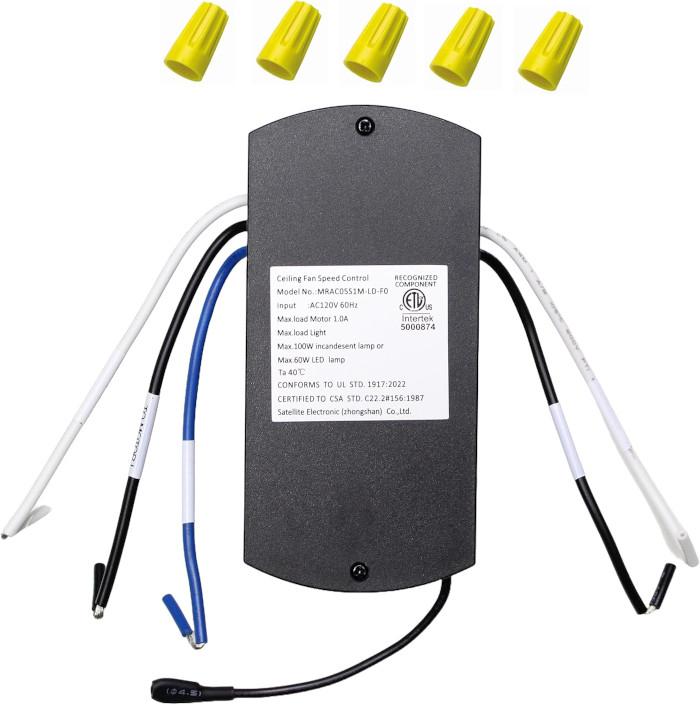
1117023 Ceiling Fan Receiver for Harbor Breeze
- Fan Model # 1117023
- Ceiling Fan Receiver
- Fits 1 model
Wire-in receiver made for Lowe's item 1117023, the Harbor Breeze fan, bringing back speed and light control from your remote.
$33.95
Ships today from FanRemotes.com
if ordered in the next
In stock
- 1-Year WarrantyOn every product
- Same-Day ShippingIn-stock orders by 4 PM
- 90-Day ReturnsSee return policy
- Expert Support(816) 586-8457Mon–Fri, 8 AM – 5 PM CT
Compatible Models
This replacement receiver for the Harbor Breeze 1117023 fits 1 model. Check the model number on your fan’s label.
- 1117023 Harbor Breeze ceiling fan (Lowe's item 1117023)
Not sure it’s the right one? Call (816) 586-8457 or email info@fanremotes.com and we’ll check it against your fan for you.
About the Harbor Breeze 1117023 Receiver
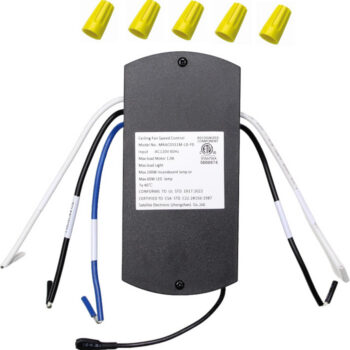
The Harbor Breeze fan sold at Lowe's as item 1117023 runs its remote through a receiver mounted above the fan. The receiver is the small box in the canopy that turns remote signals into fan and light commands, and it is the part that usually quits first. This replacement connects with wire nuts and restores three speeds, off and a dimmable light.
Your receipt, box or order history should list item 1117023; if it does, this receiver is for your fan. It pairs with learning-code remotes like our TR214D.
- Learning-code pairing, no DIP switches
- Dimmable light control
- Pairs in about 30 seconds by holding one button
- Light on/off and dimming
One remote per fan
After pairing, the receiver answers the remote it learned. Keeping a separate remote for each fan avoids surprises, like the bedroom fan changing speed when someone adjusts the living room. If you add another fan later, pair it while the others are powered off.
Seasonal direction
In summer, run the fan counterclockwise, viewed from below, for a cooling breeze. In winter, clockwise on low gently pushes warm air down from the ceiling. If your fan has a direction switch on the motor housing, stop the fan completely before you flip it.
Before you order
- It pairs only with learning-code remotes such as our TR214D. DIP-switch remotes will not pair.
Setup & Pairing
Have your remote and a fresh battery ready before you begin.
- Turn off power to the fan at the breaker.
- Drop the canopy, unscrew the wire nuts on the old receiver and note each connection.
- Hook up the replacement receiver with wire nuts exactly as the old one was wired, then tuck it into the canopy.
- Turn off power to any other nearby fans with learning receivers so they do not pair at the same time.
- Bring the power back and press and hold the remote's 0 button within about 30 seconds; let go when the light blinks twice.
- Check every speed, then turn the light on, off and dim it.
Tip: a helper at the breaker makes the 30-second pairing window easy.
In the box: Replacement receiver for Lowe's item 1117023.
Product Details
| Fan Model | 1117023 |
|---|---|
| Fan Brand | Harbor Breeze |
| Product Type | Ceiling Fan Receiver |
| Made By | Comfort Direct |
| Condition | New |
| Fan speeds | 3 + off |
| Light | On/off and dimming |
| Frequency | 304.25 MHz |
| Pairing | Learning code, no DIP switches |
| Installation | Wire-nut connections |
| Warranty | 1 year |
| Compatible Models | 1 (see list) |
| Availability | In stock |
| Ships | Same business day if ordered by 4 PM |
| Returns | 90 days on unused items |
Why Buy From FanRemotes.com?
- 1-Year WarrantyEvery product is covered against defects
- Same-Day ShippingIn-stock orders placed by 4 PM ship the same business day
- 90-Day Return PolicyBuy with confidence
- Real Remote Experts(816) 586-8457 · Mon–Fri, 8 AM – 5 PM CT
Frequently Asked Questions
Will this replacement receiver for the Harbor Breeze 1117023 fit my ceiling fan?
It fits the 1 model listed under Compatible Models on this page. If your model isn’t listed, call us at (816) 586-8457 and we’ll check for you.
Can I keep my wall dimmer?
We recommend a standard on/off wall switch. The receiver handles dimming, and a wall dimmer can interfere with it.
Is there a warranty?
Yes. Every receiver comes with our 1-year warranty.
Can I use the wall switch to turn the fan off?
Leave the wall switch on so the receiver has power, and use the remote for the fan and light. Turning the switch off cuts the receiver too.
I have two fans with the same remote. How do I keep them separate?
Pair each fan on its own with the other fan powered off, and keep one remote per fan. Labeling the remotes by room helps.
How long do I have to pair after turning the power back on?
About 30 seconds. Have the remote in hand before you restore power, then hold the 0 (fan off) button until the light blinks twice.
When will my order ship?
In-stock orders placed by 4 PM, Monday to Friday, ship the same business day.
What is your return policy?
You can return items within 90 days. Items must be unused and uninstalled, in their original packaging. No restocking fees. Please read our return policy before sending anything back. Questions? Call (816) 586-8457 or email info@fanremotes.com.
Is there a warranty?
Yes. Every product we sell comes with a 1-year warranty against defects. If it fails because of a defect, contact us and we’ll send a replacement.
Help & How-To Guides
- Harbor Breeze Ceiling Fan Remote: Find, Pair and Replace Yours
- Ceiling Fan Receiver Replacement: Signs, Testing and Choosing the Right One
- How to Add a Remote to a Ceiling Fan (Pull-Chain Conversion)
- How to Pair a Ceiling Fan Remote: Every Method Explained
- Ceiling Fan Turns On by Itself? Causes and How to Stop It
Related products
-
TG52LW3D1RCS Ceiling Fan Receiver for Harbor Breeze
$33.95 Add to cart -
BRD48MBK6LR Ceiling Fan Receiver for Harbor Breeze
$33.95 Add to cart -
BRD48BNK6LR Ceiling Fan Receiver for Harbor Breeze
$33.95 Add to cart -
TG52BNK3D1RC Ceiling Fan Receiver for Harbor Breeze
$33.95 Add to cart -
CHA52MBK5LR Ceiling Fan Receiver for Harbor Breeze
$33.95 Add to cart