
How to Find the Model Number on a Ceiling Fan Remote
When ordering a replacement remote for your ceiling fan, the most accurate way to ensure compatibility is by identifying the model number from the original remote. Below are some simple steps to help you locate this information.
Step 1: Remove the Battery Cover
Most ceiling fan remotes have their model number printed inside the battery compartment. Slide or unclip the battery cover from the back of the remote to reveal the battery bay.
Step 2: Look for the Model Number Label
Inside or near the battery compartment, look for a white or silver label. This label often includes:
- Model Number (e.g., UC7078T, RR7079TX, CHQ7081T)
- FCC ID
- Brand or Manufacturer Name
Step 3: Check the Back of the Remote
If you don’t see a label in the battery compartment, flip the remote over and inspect the back casing for any printed model numbers or engraving. Some manufacturers print the model number directly on the outer shell.
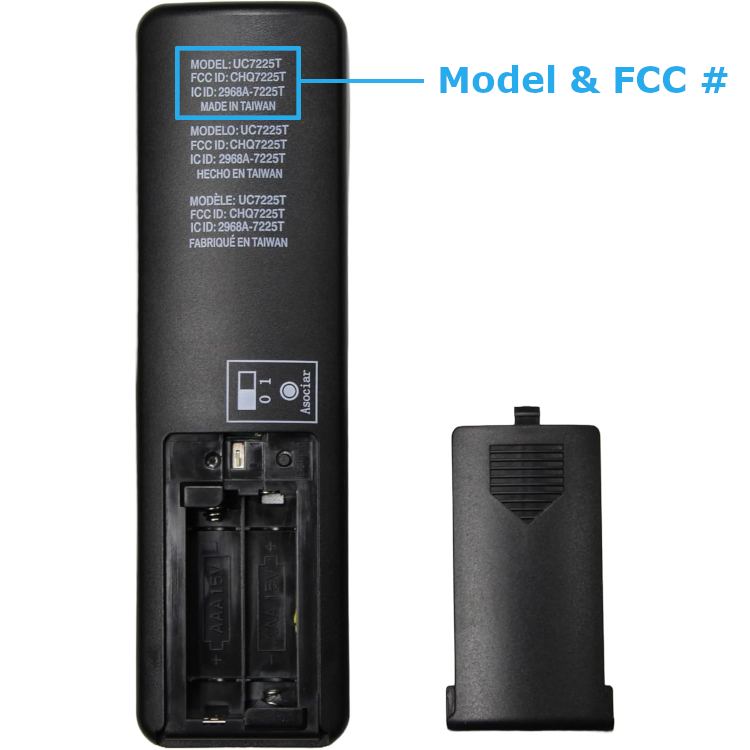
Example: Model number label on back of remote
Step 4: Take a Clear Photo (Optional)
If you’re unsure of what you’re looking at, take a photo of the remote and send it to our support team. We’re happy to help you identify the right remote!